All guides
The shirt color test
White ink on a white shirt disappears. Podjolt checks every design on every color you sell and leaves out the colors where the art doesn't read, so customers never get a shirt they can't see the design on.
What you need
- Colors added to your product type in Settings
Step by step
How the test works
For each shirt color, Podjolt looks at every pixel of your art and checks if it stands out from the fabric. A color passes when at least half the art stays clearly visible. For designs printed front and back, a color must pass on both sides. Your art is never recolored.
See the result
Each card says, for example, Ready · 8 of 11 colors. In the design's panel, colors that failed are faded and marked Not used. The Timeline says why, for example "white ink disappears on White".
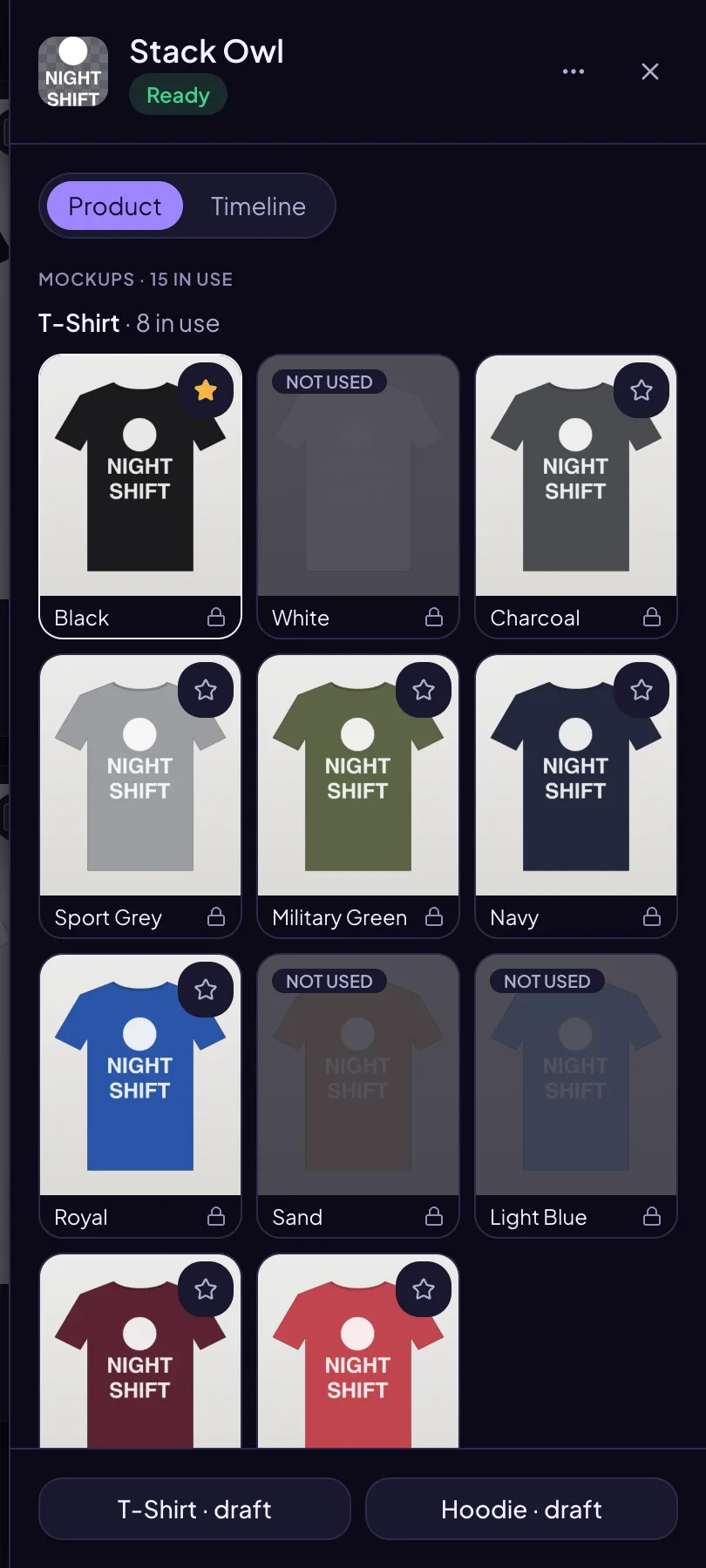
White, Sand and Light Blue are left out for a white-ink design. Keep the best ones
If more colors pass than your Colors per product limit (8 by default, in Settings → Store), the ones where the art stands out most are kept.
Overrule it
Hover a mockup and click the eye: Use … anyway adds a color, Don't use … removes one, Back to automatic lets the test decide again.
Good to know
TipColors you choose by hand show a small lock and count toward the per-product limit.
Next
- Mockups for every color A picture of the design on each shirt color, front and back.
- Review and edit a design Rename, pick colors, set the main image and clear trademark warnings.
- Publish to Shopify and Etsy One click per design or all ready designs at once, at your pace.
Ready to try it?
Free for up to 20 new products a month. No card needed.