All guides
Sell on TikTok Shop, eBay, Amazon and more
Podjolt publishes through Printify, and Printify links each of its stores to one sales channel: Shopify, Etsy, TikTok Shop, eBay, Amazon, WooCommerce, Wix, Squarespace, BigCommerce, PrestaShop, Big Cartel or its own Pop-Up Store. Every store in your Printify account shows up in Podjolt under Sell on. Turn one on and each design you publish becomes a product there too.
What you need
- Printify connected in Podjolt
- A store linked to the channel in Printify
- A seller account on that channel (TikTok Shop, eBay and Amazon are for US sellers in Printify)
Step by step
Add the store in Printify
In Printify, open the store menu at the top left and choose Manage my stores. Click Add a new store (or Connect if it's your first), choose the channel, and sign in to it there. A few channels ask for more before Printify can publish:
- TikTok Shop (US): switch your TikTok shop to Seller Shipping, and submit and verify your tax information in TikTok Seller Center. Orders must ship within 2 business days.
- eBay (US): add a payment method for selling fees in eBay. If you're a new eBay seller, make your very first listing on eBay itself.
- Amazon (US): request a GTIN/UPC exemption for your products first, and tick I have requested GTIN exemption when you finish connecting. Only products from US print providers can go to Amazon.
- Pop-Up Store: Printify's own free store. Choose Pop-Up Store, give it a name and a theme, and complete Stripe verification to get paid.
Refresh your stores in Podjolt
Open Settings → Store → Sell on and click Edit. Under Other stores in your Printify account, click Refresh stores. Each store is listed with its channel and its name in Printify, for example TikTok Shop · My Shop.
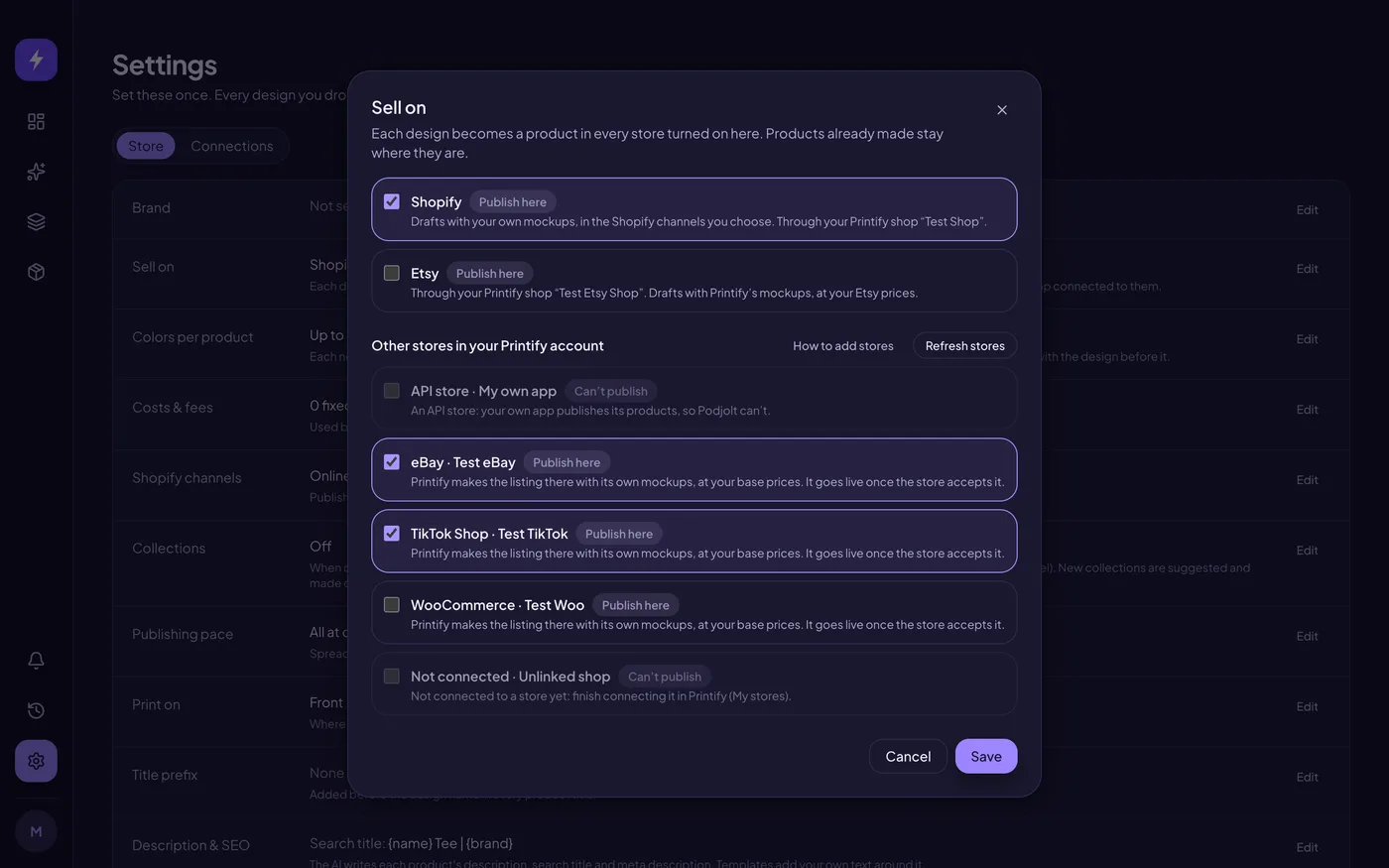
Sell on lists every store in your Printify account. TipA store Printify hasn't linked to a channel yet shows Not connected, and a store run by your own app shows API store. Both are listed but can't be turned on.
Turn on Publish here
Tick the stores you want and click Save. Shopify and Etsy work exactly as before, and you can sell on any mix of stores, with or without Shopify.
Publish as usual
Click Publish on a design, or publish many at once. Each design becomes one product per product type in every store that's on. On the Products page each product shows its store, and the Channel filter shows one store at a time.
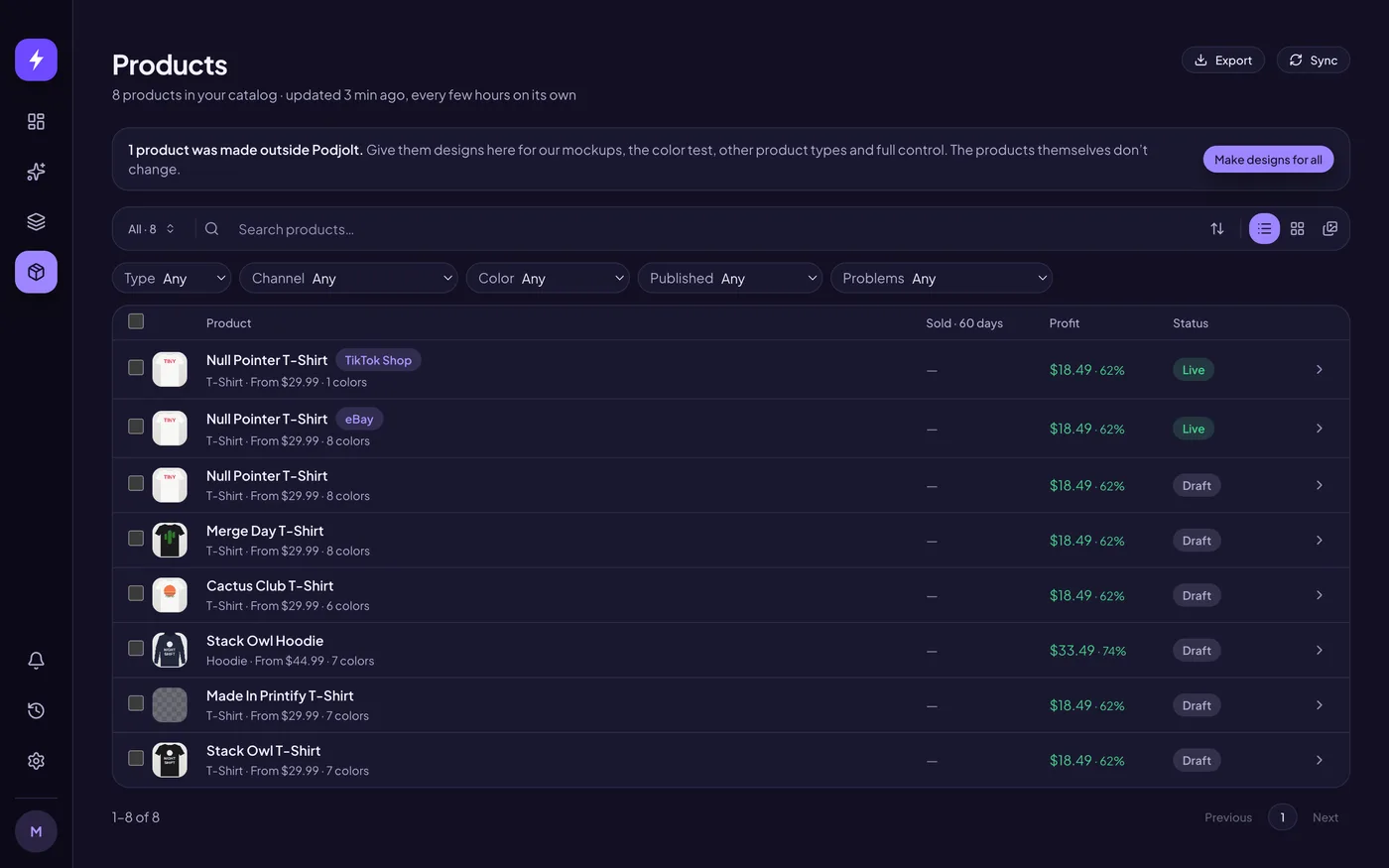
The same design on Shopify, TikTok Shop and eBay.
Good to know
Good to knowWhat each store gets. Shopify: a draft with your mockups. Etsy: a draft with Printify's mockups, at your Etsy prices. Every other store: a visible listing with Printify's mockups, at your Shopify prices, made by Printify. It shows once that store accepts it, and some stores review new listings first. To hide or end a listing there, do it in that store or in Printify.
Good to knowTitles longer than a store allows are shortened at a word for that store only: 80 characters on eBay, 200 on Amazon, 255 on TikTok Shop. Your tags go as they are; Etsy keeps its 13 tags of up to 20 characters.
TipChanging a product's colors, prices or name in Podjolt updates it in Printify and publishes it again, so the store follows. Delete product and Undo remove it from Printify too.
Watch outEach product in each store counts as one product: one design as a T-shirt on Shopify, TikTok Shop and eBay is 3 of the free plan's 20 a month.
Next
- Publish to Shopify and Etsy One click per design or all ready designs at once, at your pace.
- Choose products, colors and prices Pick the blank garment, its colors, sizes, prices and print size once.
- Plans and billing Free for 20 new products a month. Unlimited for everything else.
Ready to try it?
Free for up to 20 new products a month. No card needed.